v0.1.60 brought Notes, Todo, and a unified Notebook surface
A big writing-and-organizing release. Plan, Notes, and Todo are now three modes of one Notebook surface, a Quick Note scratchpad is one keystroke away on every page, chat threads gained a per-thread Context panel, and you can hand a running thread between Local and a Worktree. The Canvas also picked up a full whiteboard, and voice notes landed in chat.
// What's New
Notes: an Apple-Notes-style writing surface alongside Plan. A note list with search and pinning on the left (grouped by date), the same block editor you know from Plan on the right, with the chat pane wired in. Per-workspace, stored locally under aiola/notes/. Plan, Notes, and Todo are now modes of one Notebook surface — switch between them with a segmented control in the header
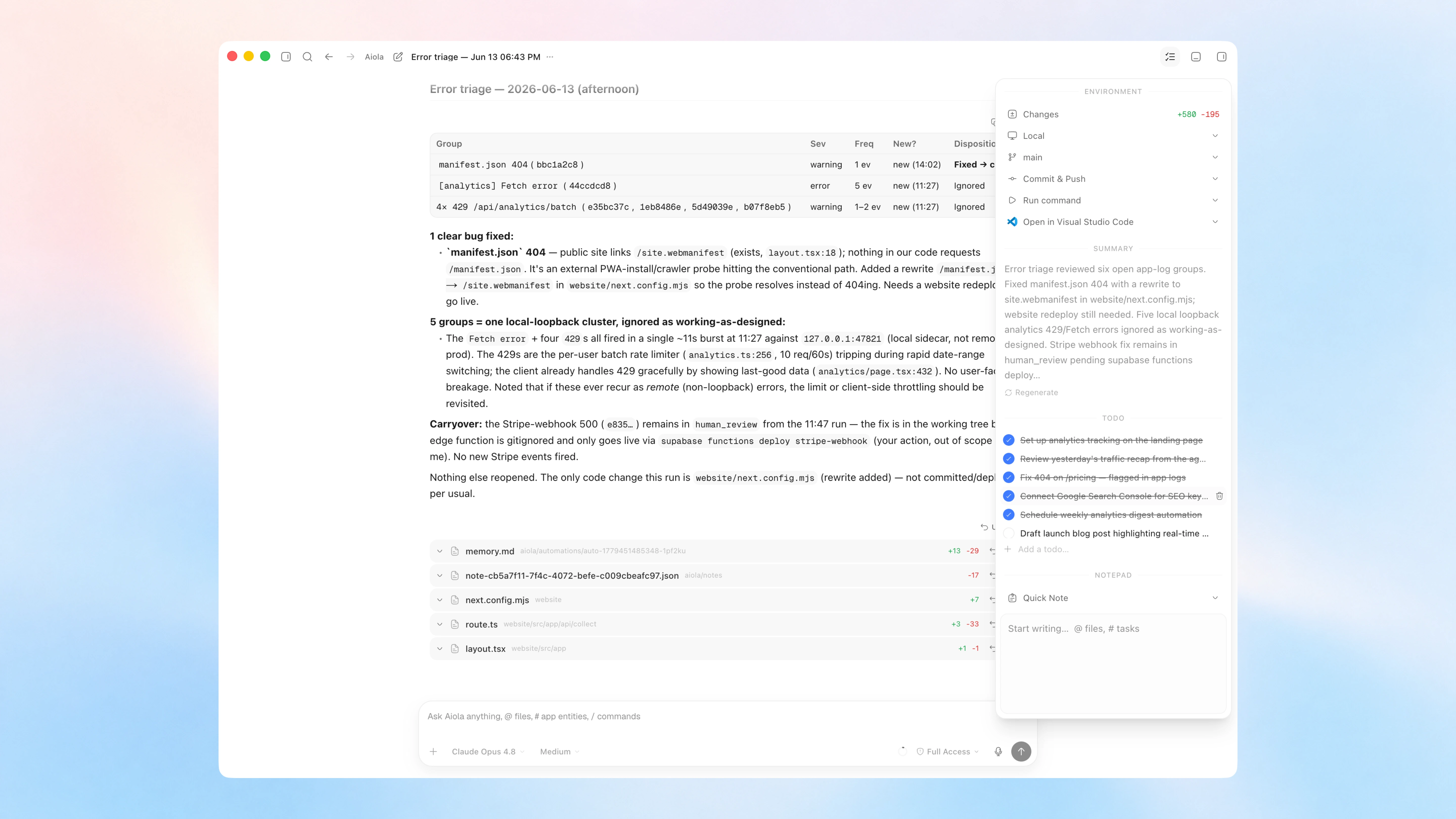
Todo: a third Notebook mode: a single per-workspace checklist. Just start typing — every line is a checkable item, press Enter for the next one, and check things off as you go (shift-click a checkbox to toggle a whole range at once). Hide or clear completed items to stay focused. Stored locally under aiola/todos.json, with the chat pane wired in so the agent can add or check off to-dos for you
Quick Note (floating scratchpad): a scratchpad one keystroke away on every page of every workspace. Toggle it with ⌘⇧J (Ctrl+Shift+J) or from the command palette. It's the same block editor in a compact frame, so formatting and checkboxes just work — and you can drag it to any of nine slots (corners, edges, or centered)
Notebook chat knows your notes: #note-mention any note to pull it into a chat turn, and let the agent create, append to, and read notes directly while it works, so a conversation can spin up or update a note without leaving the composer
Per-thread Context panel: every chat thread gets a Context button in its header that opens a side panel with a Notepad and a Changes view, each kept separately per thread. The Notepad reaches your whole workspace: open any note, switch between them, or start a new one right from the panel — the same notes you write in the Notebook
Reworked side panel: the dashboard side panel now opens to an empty-state picker — Review, Terminal, Browser, or Files — so you choose what to open instead of it defaulting to a view. Toggle the panel with ⌘E; the views have their own shortcuts (Review ⌃⇧G, Browser ⌘T, Files ⌘P). Those view shortcuts now only open and focus their tab — pressing one again keeps it open instead of toggling it closed, and pressing a view's shortcut from another tab jumps straight to it
Hand off a running thread between environments: once a thread has started you can move it between Local and a Worktree from the environment selector. The handoff stashes the working tree, materializes (or removes) the worktree, and re-applies your changes on the other side, so you can switch where a conversation runs without losing work
Canvas whiteboard: sketch right on the Canvas dashboard: shapes, arrows, text and sticky notes, a freehand pen, and an eraser, layered beneath your terminal/browser/chat/image/file cards. Drag, resize, and rearrange anything, and pick a background to taste
Bigger canvas panels: terminal, browser, chat, image, and file cards now open noticeably larger by default (terminals jump from 600×400 to 820×560), so there's real room to work the moment a panel appears. Minimum sizes scaled up to match, and "arrange" tiling uses the new dimensions
Voice notes in chat: dictate straight into the composer. Tap the mic and a recording pill appears instantly with a live waveform and timer; stop to transcribe, or cancel to discard. No API key to configure — transcription rides on your existing ChatGPT sign-in through Codex
// Improvements
The Quick Note has its own spot in the command palette and a dedicated keybind, and its position — any of nine slots (corners, edges, or centered) — lives in Appearance settings
Canvas dragging, resizing, and sketching stay smooth with many panels and shapes on screen, and a selected panel now shows a rounded highlight that matches its card
App Logs gained an Ignored group: muted issues collapse into their own collapsible section instead of cluttering the active list, and bulk shift-select reaches across the Active, Closed, and Ignored sections
Arrowing through @-mention and command suggestions now keeps the highlighted row scrolled into view, so keyboard navigation never runs off the bottom of the popup
The sidebar's Notebook entry stays highlighted whether you're on Plan, Notes, or Todo, since they're one surface
The analytics "Online" pulse dot now only appears when at least one visitor is live, instead of pulsing next to a zero
// Fixes
Terminal history persists and is shared: Terminals now read and write your real shell history, so arrow-up recalls commands from your other terminals — including a new tab, or the app reopened the next day — instead of starting blank each time
Login no longer locks itself out: A dead refresh token used to make the app hammer Supabase's /token endpoint from several places at once (auto-refresh timer, Realtime reconnect, and every authed query retrying independently), tripping a per-IP rate limit that then blocked even a fresh Google/OTP sign-in. A client-side circuit breaker now bounds refresh traffic: terminal failures purge the session and open the breaker, bursts short-circuit without hitting the network, and any successful new sign-in resets it. Only refresh-token calls are guarded, so a fresh login always passes through